For iPhone · coming soon to the App Store

Your eyes are changing.
See it for yourself.

Nefona measures your near vision with your phone; on day 28 it shows your map side by side with your starting point. A 15-minute path every day; you track your eyes, focus and calm on one map.

Progress For now, only in the test version Shown with sample data. In the app, only the areas where you've improved since your first measurements light up.

Are you holding your phone a little farther away than before? Do letters blur in the evening?

  • Your camera image never leaves your phone
  • 7 days free, ages 18 and up
  • Does not diagnose or treat

Eye

The exercises are not meant to correct near vision.

Focus

Breathing

Mood

Movement

Endless path

The path opens as you walk it

Scroll down and live the first 30 days. The phone shows what someone who finishes their path every day sees in the app: each new stop opens on its day, the eye on the screen gains a ray each day, and the streak grows.

For now, only in the test version

The app is in Turkish for now; the screens here are shown in translation.

Near vision

A short sample of the measurement in the app

Try the E testLetter 1/5

Which way is the open side of the E facing?

Real-size lettersDistance by cameraResult: logMAR
Why we start with the eyes

Your eyes are the first to show tiredness

We look at things up close all day: our eyes get tired, we blink less, and in the evening letters blur. Nefona starts with what can be measured best, the eyes; sleep, focus and calm are part of the same day, so they sit on the same map.

20-20-20

Breaks worked as long as people were reminded

The rule of looking into the distance for 20 seconds every 20 minutes was tried for two weeks, with a reminder, by 29 people who use screens: their digital eye strain and dry eye complaints went down; when the reminder stopped, the complaints came back within a week. Looking into the distance and the break in Nefona's daily path apply this rule and remind you of it every day.

Source: Talens-Estarelles et al. 2022, before–after study
Light · sleep

Light and your body clock

In university students, daytime light was the factor that best explained how sleep and the body clock change with the seasons; in a meta-analysis that pooled 19 studies (556,861 people), depression and anxiety were more common in people exposed to light at night (an observational link, not cause and effect). That is why Nefona's morning alarm is designed around daylight, and its night clock around darkness.

Sources: Dunster et al. 2022 · Deprato et al. 2025
±0.2 logMAR

A single test can mislead, a series does not

logMAR measures vision in lines of an eye chart: 0.1 is one line. A single near vision test can vary by ±0.2, which is about two lines. In real-world use of another home monitoring device, 47 of 52 alerts at one center turned out to be false; smartphone tests, on the other hand, were compared with the clinic eye chart in other studies and were found to agree with it. That is why Nefona does not go by a single result; it flags a change only if 3 tests in a row differ from your baseline (the median, which is the middle value when sorted) in the same direction. Nefona's own test has not yet gone through a separate clinical comparison; we say this openly too.

Sources: Yu et al. 2021 · Faes et al. 2021 · Han et al. 2019 · Katibeh et al. 2022
Your day with Nefona

A breath in the morning, 15 minutes during the day, a calm clock screen at night

Real screens from the app. Each stop writes what it records to the Progress tab and the iris map; the iris map is not a real photo of an eye, but a drawing that shows how much has been recorded in seven areas. For now, Weather and the Progress center are only in the test version.

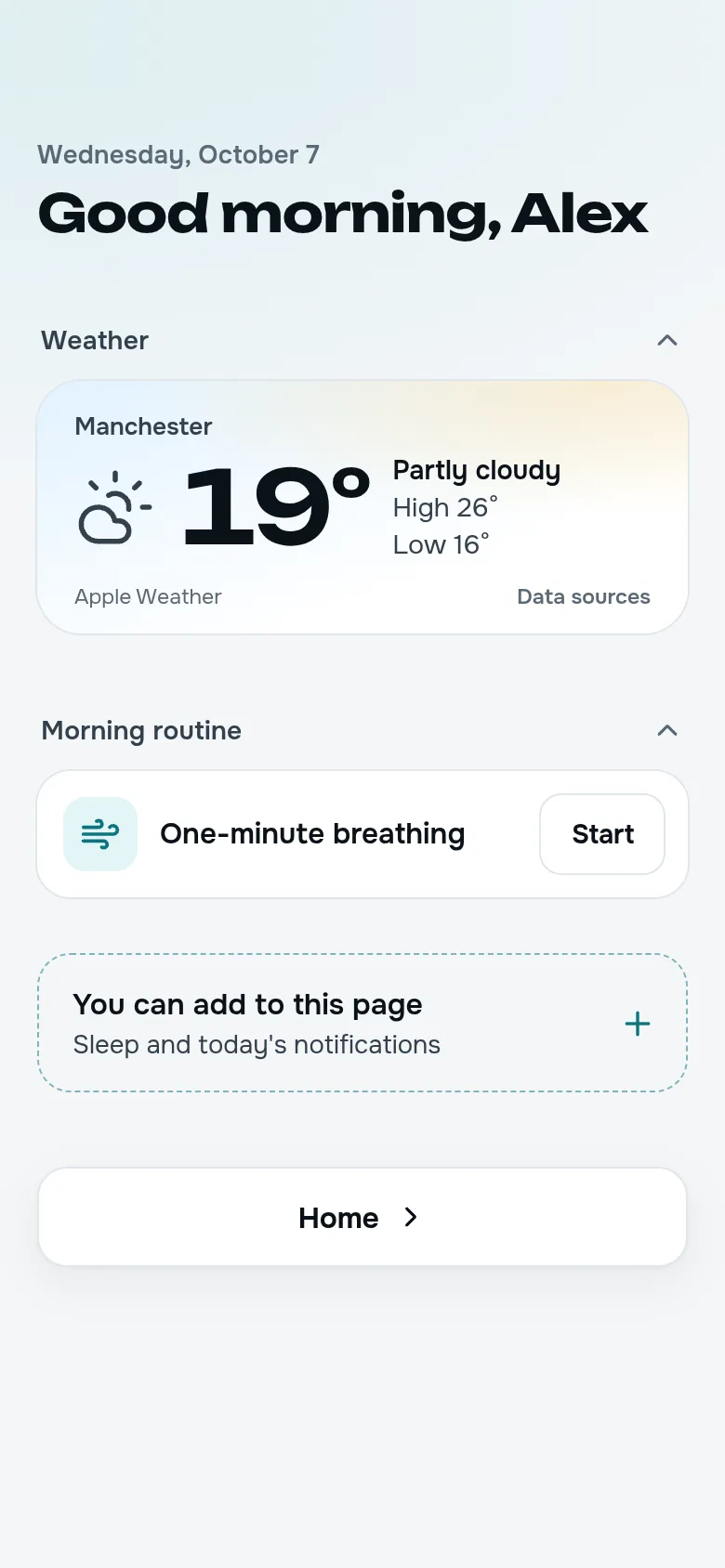
Start the Day screen: “Good morning, Alex”, the day's weather, and “One-minute breathing” with a “Start” button in the morning routine
07:30 · MorningWhen you stop the alarm, the Start the Day screen opens: the day's weather and one minute of breathing. The wake-up sounds were composed just for Nefona.
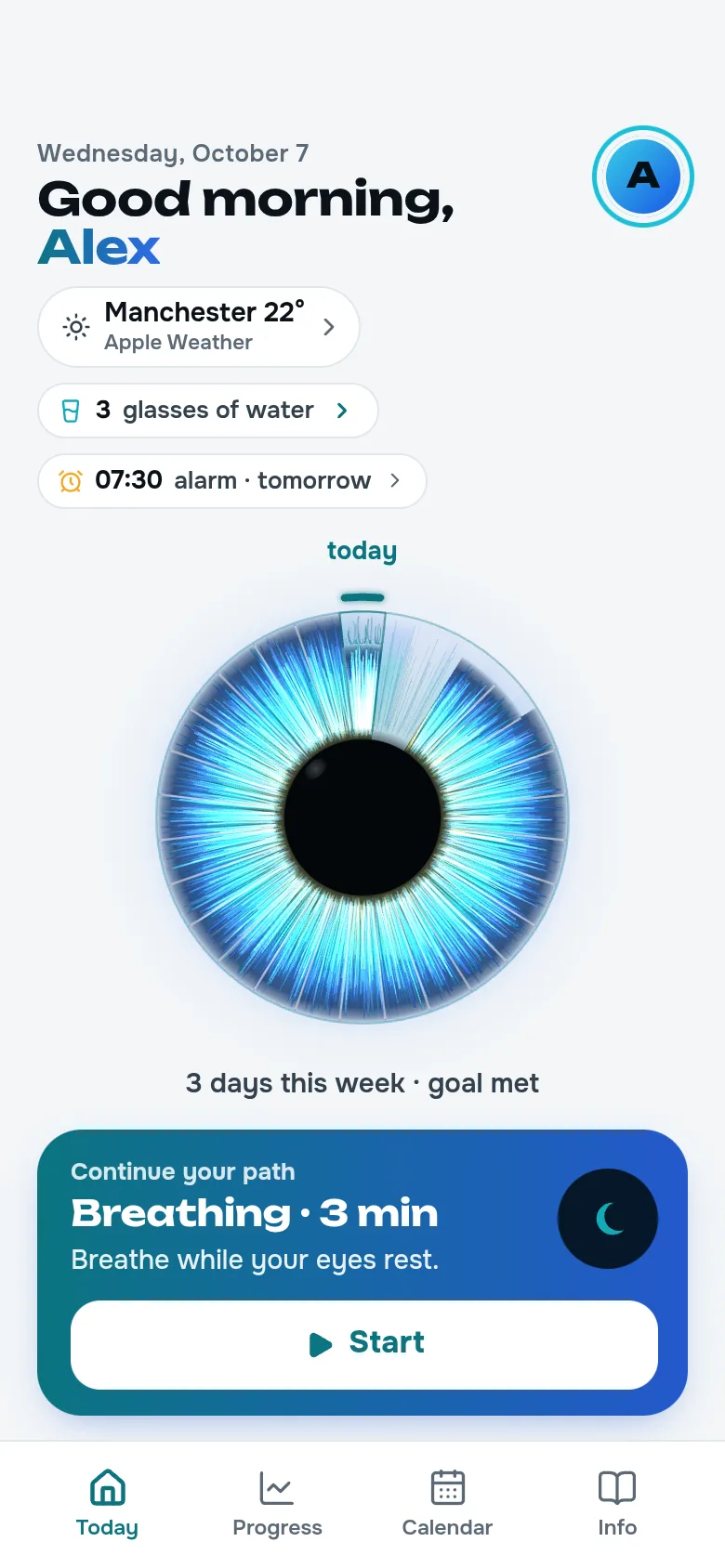
Today screen: “Good morning, Alex”; weather, water and alarm buttons; the day's eye; “3 days this week · goal met”; and a “Continue your path: Breathing · 3 min” card
10:00 · TodayThe day at a glance: the eye that gains a ray every day, your weekly goal and the big card that lets you pick up where you left off.
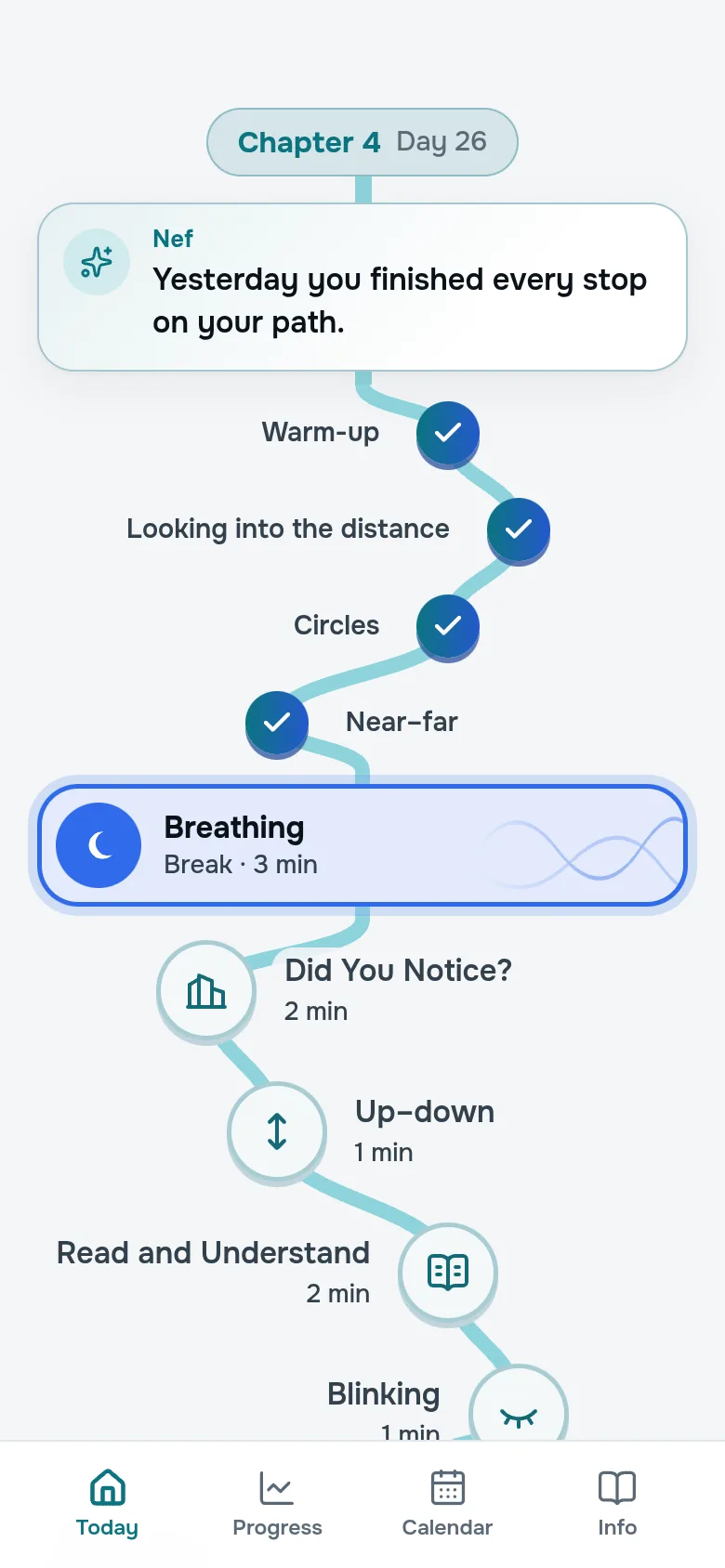
The day's path on Day 26, in Chapter 4. Nef: “Yesterday you finished every stop on your path.” Warm-up, Looking into the distance, Circles and Near–far are done; next comes a breathing break (3 min), then Did You Notice?, Up–down, Read and Understand, and Blinking.
3–19 min · PathOn the first day the path is 3 minutes plus the E test, and on the second day 8 minutes. It gets longer as new stops open; after that, most days it takes 14–19 minutes. One day a week, the E test is added to the path.
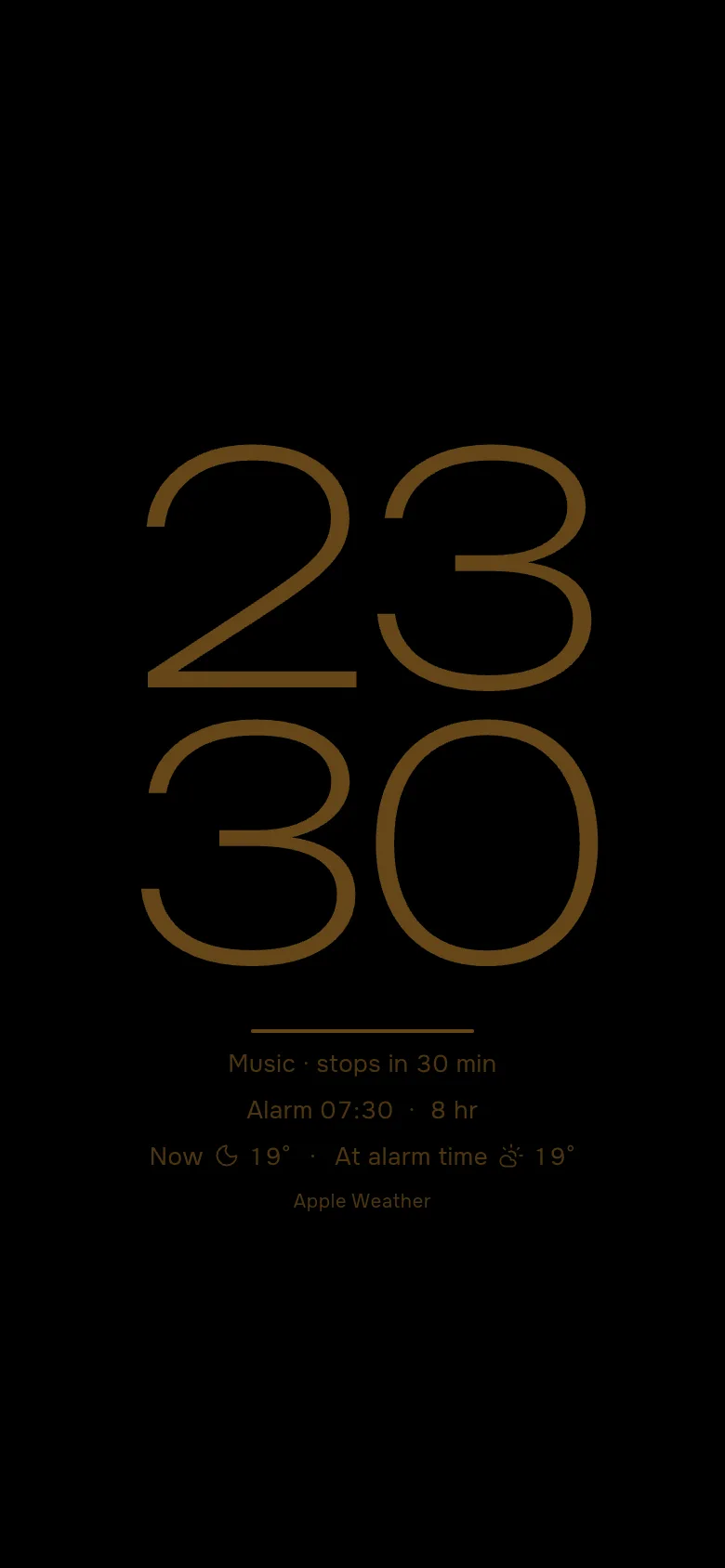
Night clock: amber 23:30 on a black screen, “Music · stops in 30 min”, “Alarm 07:30 · 8 hr” and a weather line
23:30 · NightThe sound you chose for sleep slowly fades out; the screen shows only an amber clock, so when you look at your phone at night, the light does not strain your eyes. The alarm is ready for the morning.

The app is in Turkish for now; the screens here are shown in translation.

28 days

A map at the start, side by side on day 28

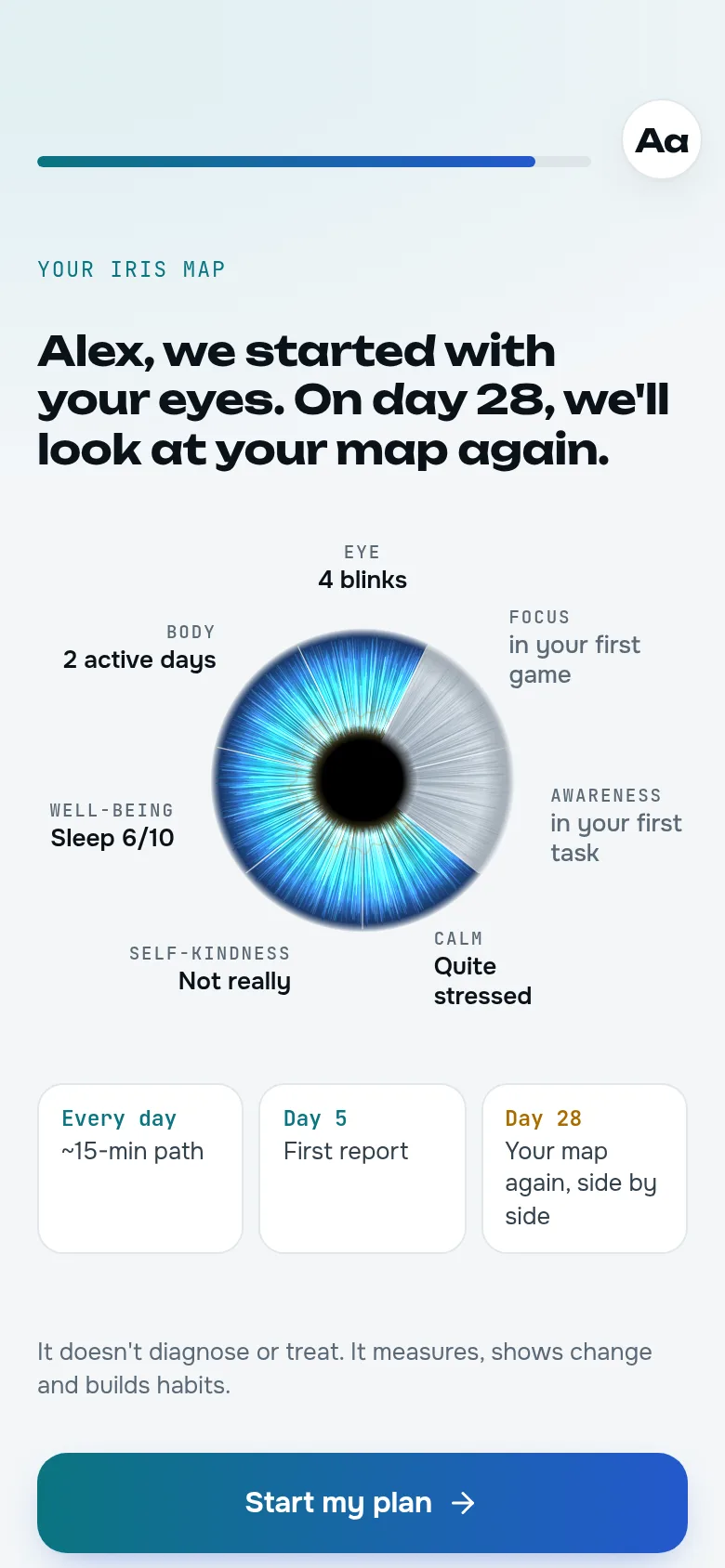
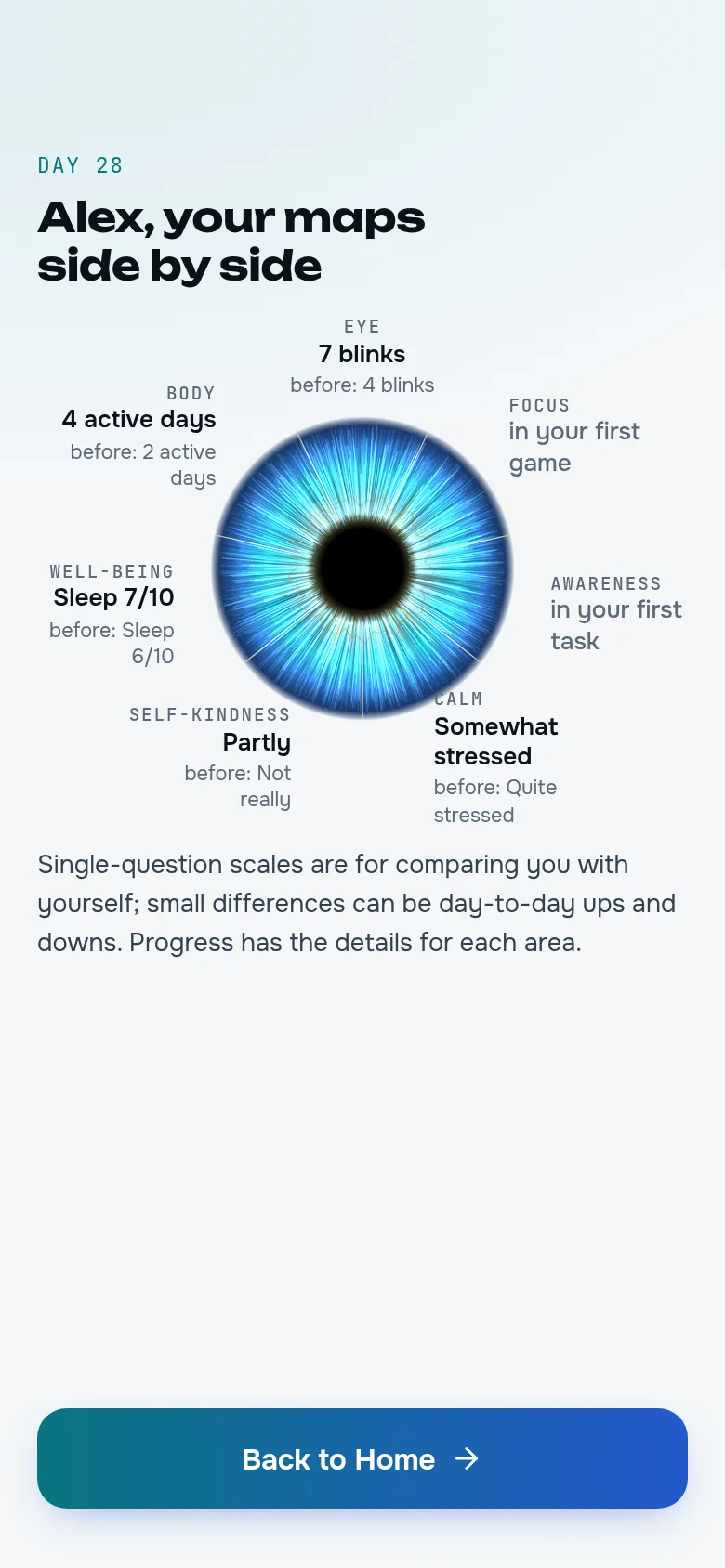
During setup, the camera counts how many times you blink in 20 seconds; then you answer four short questions. This is the start of your iris map: the eye at the center, seven areas around it. Your first report comes on day 5. On day 28, the same measurement is taken and the same questions are asked again; the map also shows the starting value under each area. Change is not promised in words; it shows in numbers.

Setup: “Alex, we started with your eyes. On day 28, we'll look at your map again.” The iris map and the starting values of the seven areas
Day 1Your starting map: 4 blinks, sleep 6/10, 2 days of movement; one answer each for stress and self-kindness.
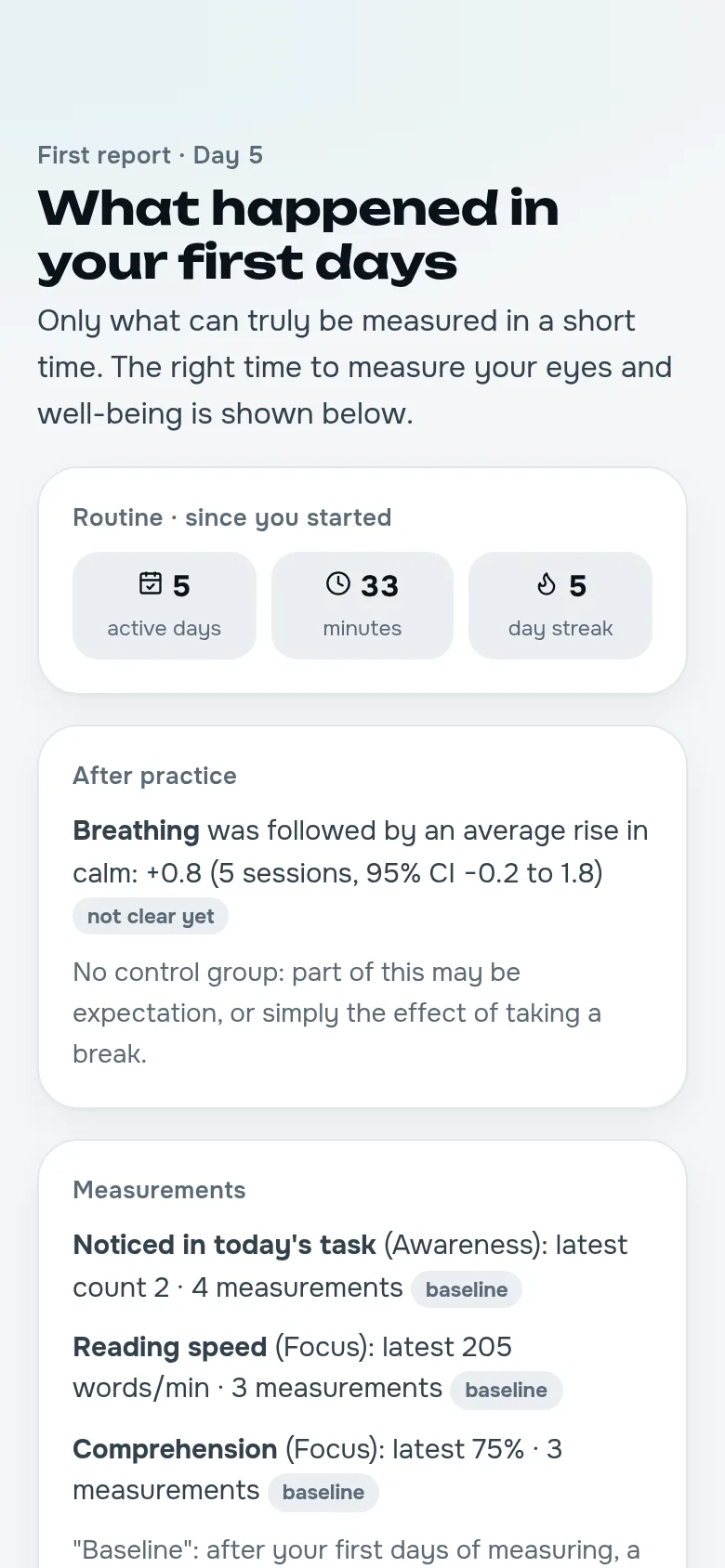
First report · Day 5: “What happened in your first days”; 5 active days, 33 minutes, a 5-day streak; calm after breathing +0.8, not clear yet; first measurements for reading speed and comprehension
Day 5The first report shows what can truly be measured in the first days: your routine, the change in calm after breathing and your first measurements. It does not comment on your eyes yet: the first E test is for getting used to it, and your baseline is set once 3 weekly tests are done.
Day 28: “Alex, your maps side by side”; Eye 7 blinks (before 4), Body 4 active days (before 2), Sleep 7/10 (before 6)
Day 28Same measurement, same questions; before and now side by side for each area. The screen itself tells you that small differences may just be day-to-day variation.

The app is in Turkish for now; the screens here are shown in translation.

Progress

Is the change real, or just test-to-test variation? This screen tells you.

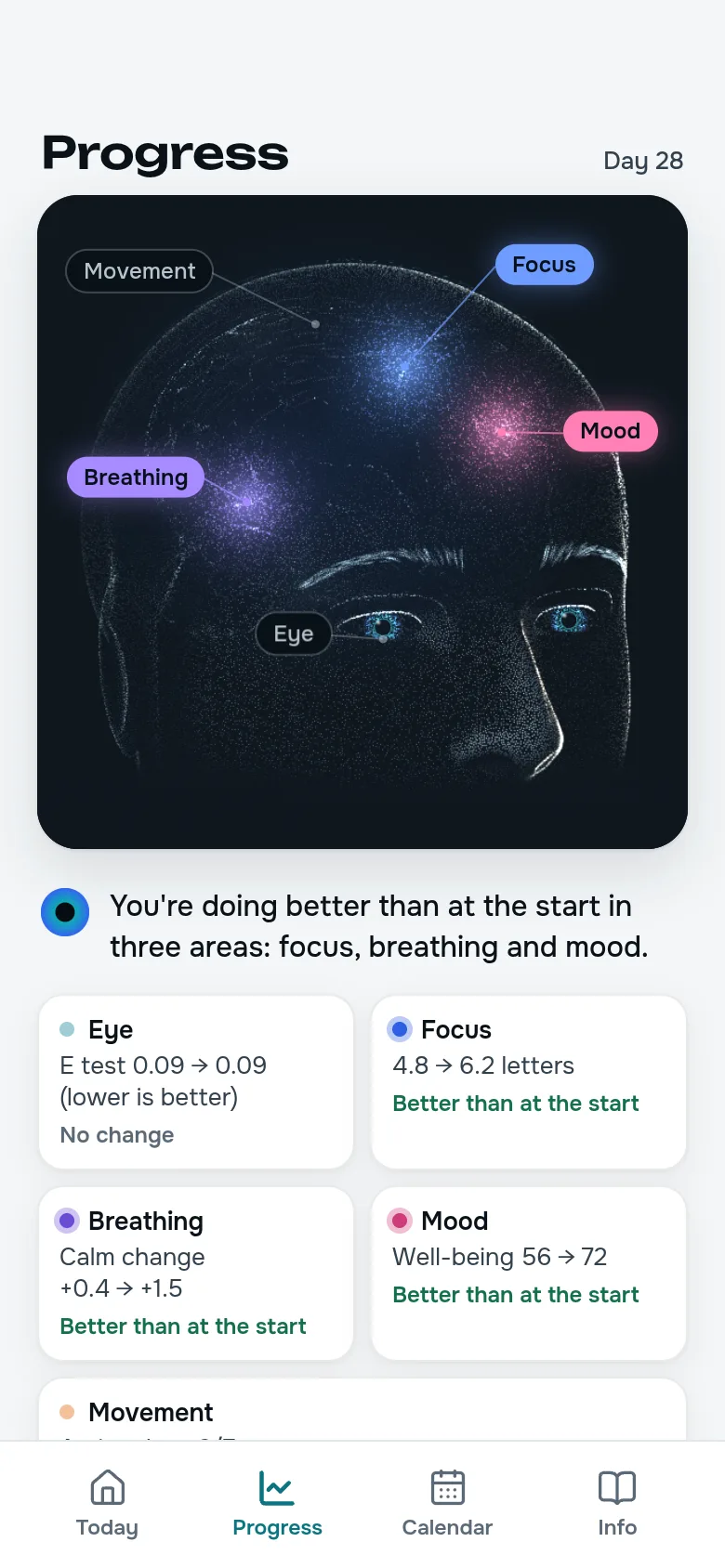
Every module writes what it records to the same place; the Progress tab, the iris map, Nef and the reports all read the same records. For the eyes, the rule is clear: if each of your last 3 tests in a row differs from your baseline (the median, which is the middle value when sorted) in the same direction by at least 0.10 logMAR, which is one line, it says “confirmed change”; if not, it doesn't. In the example screen it doesn't; this is what honesty looks like.

  • Nef is the coach inside the app: it looks at your records and picks one of a set of pre-written sentences. It runs on your phone, does not connect to an AI model and sends no data. What it says is not medical advice.
  • Show my doctor: a PDF and a CSV with your measurements and the calculation rules written out.
  • If your measurements get worse several times in a row, the app tells you to “see an eye doctor”; it does not make the decision itself.
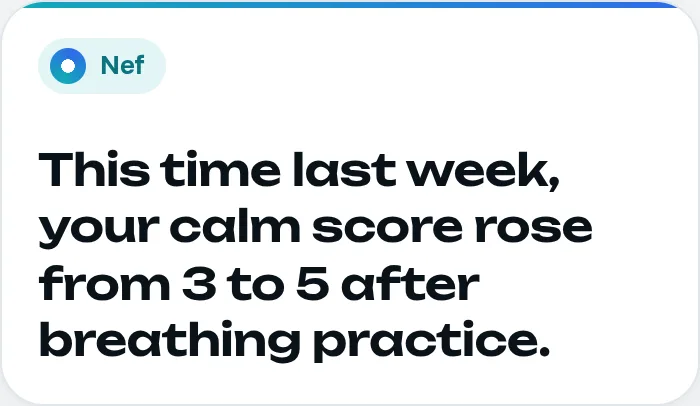
Nef card: “This time last week, your calm score rose from 3 to 5 after breathing practice.”
Progress center, Day 28: the areas on a head made of light; “You're doing better than at the start in three areas: focus, breathing and mood.” Eye: E test 0.09 → 0.09, no change; Focus: 4.8 → 6.2 letters; Breathing: calm change +0.4 → +1.5; Mood: well-being 56 → 72
For now, only in the test version The app is in Turkish for now; the screens here are shown in translation.
Nef

What does Nef do?

Nef is the coach inside the app. It looks at your records and picks one of a set of approved, pre-written sentences; the sentences aren't written by AI. It runs on your phone and sends no data. What it says is not medical advice.

  • Short notes at the start of your path: “Yesterday you finished every stop on your path.”
  • A card when something changes: “This time last week, your calm score rose from 3 to 5 after breathing practice.”
  • It doesn't repeat itself: the same sentence won't come back for 21 days, and a topic you've skipped three times won't come up for 14 days.
  • It doesn't talk about sleep or eye measurements. Eye warnings come from the app, not from Nef: “Please see an eye doctor.”

Notifications

You choose their times and days: break (12:30), walking, breathing, water. Nef and weather notifications aren't sent at night, between 23:00 and 07:00.

If it's going to rainAlex's walk reminder is at 15:00. Rain is expected at 14:00 today. At 12:00, Nef sends a single notification:

Your reminder stays as it is; the choice is yours. This notification isn't sent if you've walked enough that day or your path is done. Nef sends at most 1 notification a day and at most 4 a week. For now, only in the test version and only if you've allowed weather access.

40 cmreading distance; the front camera measures the distance and warns you if you are too close or too far
One eyeright and left eye separately, with the other eye covered by your palm; once a week, three measurements: right, left, both eyes
Same conditionsevery time with the same glasses, or without glasses; the app asks, and keeps the results for each condition separate
28 lettersfor each eye in the weekly test; the E gets smaller, and “I can't see it” is also a valid answer
How it measures

Letters drawn at real size, distance measured by the camera

Letters are drawn at their real size based on your phone's screen dimensions. In the test you swipe your finger toward the open side of the E; the letter gets smaller, and when you can't make it out, you say “I can't see it.” The result is saved on the logMAR scale, the same unit used with the eye chart at the clinic.

Modules

Measurements, exercises, practices

Each module measures or records something and shows it in Progress. See the full list

Eye

  • measurementShort E gameAn optional short E game for the right and left eye: you tap or swipe toward where the E is facing, and your near visual acuity is recorded in logMAR.
  • measurementReadingAs the text gets smaller, it finds the smallest size you can read comfortably.
  • exerciseExercise setsTakes you through looking into the distance, eye movements and blinking, with voice guidance. You choose the Light, Normal, Full or Deep set; the Deep set also includes breathing steps.
  • practiceAt a GlanceYou look at the dot in the center while letters flash beside it for a moment. It measures how many letters you recognize without moving your eyes.
  • measurementWeekly E gameA full measurement once a week from day one: right eye, left eye and both eyes, 28 letters each.

Focus and awareness

  • practiceAwarenessWhere the focus and noticing tasks are gathered; here you see which one you did and when.
  • practiceDid You Notice?A task where you notice a small change in the scene.
  • practiceToday's taskOne noticing task a day; at the end you write down what you noticed.
  • practiceRead and UnderstandYou read a short text and answer four questions.
  • practiceQuick LookA car or a truck flashes in the center for a moment, along with a star at the edge. You say what was in the center and where the star was; the shortest display time at which you get both right is recorded.
  • practiceSnakeYou steer the snake with your eyes; the camera follows your gaze.
  • practiceCirclesYou follow moving circles with your eyes; reaction and accuracy are measured.
  • practiceCatch and TypeTwo words flash for a moment; you catch them and type them.

Life

  • practiceAlarmA morning alarm, wake-up sounds made for Nefona, and a sound that slowly fades out as you fall asleep.
  • practiceBreathingYou do one of eight breathing patterns with voice guidance; you are asked how you feel before and after.
  • practiceWaveMusic in Calm, Power and Motivation modes; it plays during breaks and as you fall asleep.
  • exerciseStand TallStretch the top of your head upward, tuck your chin in, pull your shoulders back.
  • practiceSky breakYou look far away and up for two minutes; before and after are recorded with a single question.
  • practiceBreakA one-minute eye break; when the daily time for games and eye movements runs out, it locks them automatically.
  • practiceWaterWater log and reminder.
  • measurementWell-beingA well-being score from five short questions every two weeks (WHO-5 scale, official Turkish version).
  • practiceYogaShort voice-guided lessons: breathing, deep rest, focus.
  • practiceDirectionShort written practices for getting to know yourself and for self-compassion.
Voices

Spoken guidance: you hear what the screen says

In exercises and tests you don't have to keep looking at the screen: the instructions are read aloud in one of two prerecorded voices, and you choose the voice once on your profile page. The app does not go online for the voice. Listen:

Female voice exercise · break

Look over your phone at a point far away.
Close your eyes. I'll let you know with a sound when it's over.

Male voice exercise · break

Look over your phone at a point far away.
Close your eyes. I'll let you know with a sound when it's over.
Privacy

Your camera image never leaves your phone

The camera works only to measure distance, blinking and gaze direction. The image is processed on your phone and discarded right away; only numbers remain.

ImageProcessed, then discarded. Not saved, not sent, not even shown on the screen.
NumbersDistance, blink count, gaze direction, test results: they stay on your phone. There is no account.
ConsentYou are asked for separate permission for each job, such as reading step data from the Health app or showing the weather; you can take back any permission at any time. You can delete all your data on the phone with one tap.

Privacy and data protection

78peer-reviewed studies, with full citation and DOI, inside the app
6evidence cards: the basis, limits and level of evidence for the main measurements and practices
7areas on one map: eye, focus, awareness, calm, self-kindness, well-being, body
3 testsin a row: for the eyes, the app looks not at a single result, but at whether three tests go in the same direction
Based on science

The studies behind the measurements and practices are listed

Nefona's measurements and main practices are based on peer-reviewed studies; the type of evidence (meta-analysis, randomized trial, observational) and its limits are shown right next to them. A study says “this was seen under these conditions”; Nefona says the same, and nothing more.

Coming soon to iPhone · Ages 18 and up

You've looked at screens all day.
Now look after your eyes.

Look after your eyes with numbers, not guesswork: Nefona measures your near vision on your phone, and on day 28 it puts your blink count and your answers about sleep and stress side by side with day one.

Apart from these two emails, we won't write to you, and you can leave the list at any time with the link in each one. We delete the list after the announcement. See the privacy notice for how your data is processed. Nefona does not diagnose or treat.